 Family Weather
Compare the Weather in Two Cities, Side by Side, Right Now
Published November 13, 2026 by Gridwhistle.
When you look up the weather in another city, there's usually a person there. Mom in Miami. Your brother in Denver. A friend who moved across the country. Seeing their day next to yours is a small way to feel close, and it often turns into a call.
Today's weather vs. the usual weather
Many "compare two cities" pages show climate averages: how warm July usually gets, or how many rainy days a year. Those are great when you're planning a move or a trip. They won't tell you whether Mom needs a coat this afternoon. For that you want today's forecast for both places, side by side.
Three ways to compare two cities right now
In Apple's Weather app
The Weather app on iPhone already does the basics. Open the list of locations, search for the other city and add it. Now you can swipe between your forecast and theirs, or see both cities' temperatures in the list. For a glance from your Home Screen, add a second Weather widget and set its location to their city. It's free and built in.
With a quick search
Type "weather" and the city's name into your browser's search bar. Most search engines show a forecast card at the top. Open two tabs, one for each city, and flip between them. It works on any phone or computer, but you have to do it again every time.
With Family Weather's Compare
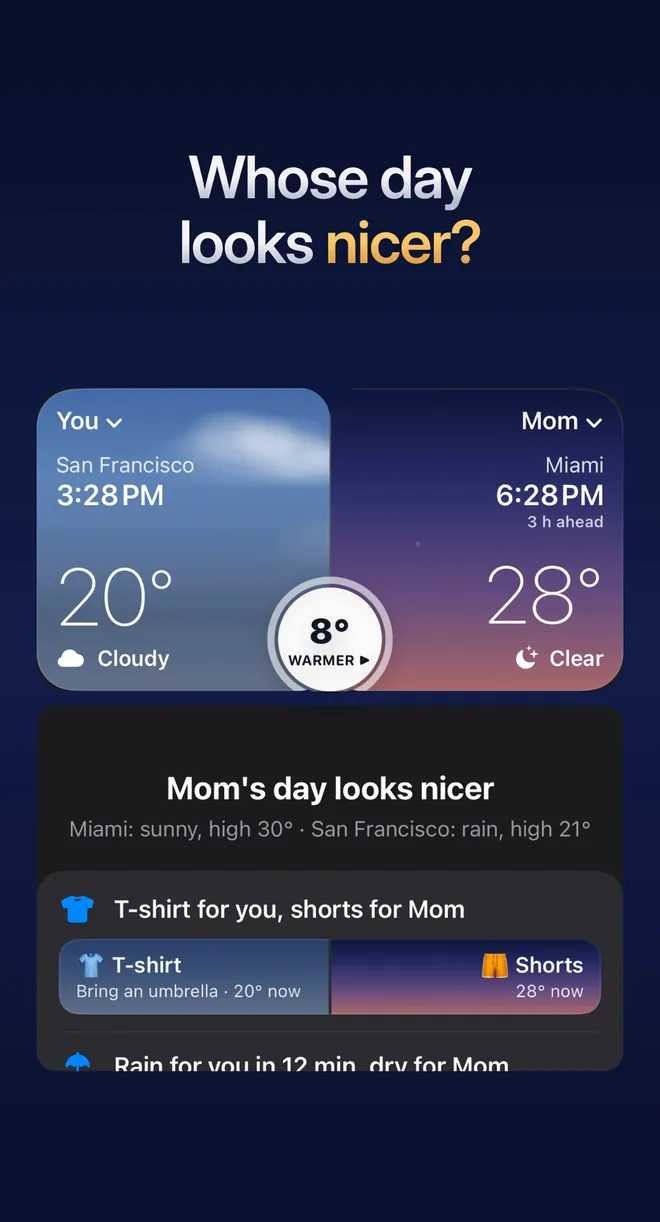
Family Weather puts two skies next to each other and answers in plain words: whose day looks nicer, what to wear, who gets rain and a good time to call. Tap Compare on the Family tab or on anyone's page. It works with your iPhone upright or sideways.
To compare any city with yours, add it as a person: open Family, tap Add someone and choose the city. Compare is part of the free app, which covers you and two people.
What to look at
Whichever way you compare, a few details tell you the most about someone's day.
- The temperature gap. A 20-degree difference is a conversation starter on its own. It also tells you who is in a sweater and who is in shorts.
- When the rain comes. A rain icon for the day doesn't say much. Look at the hourly forecast to see if rain lands on their walk to work, or holds off until evening.
- The time there. If they're three hours ahead, your lunch break is their late afternoon. Check their local time before you call, so you don't ring during dinner or after bedtime.
- Daylight. In winter the sun can set hours apart in two cities. A friend up north may already be in the dark while you're still out in the sun.
Turn it into a text
Comparing is more fun when you share it. A good weather text is short, specific and a little playful. Try this recipe: the two temperatures, one honest detail and a light joke.
"Miami is 26°F warmer than Chicago today: 84°F there, 58°F here. Hoodie on my end, shorts on yours."
That's the kind of text Family Weather writes when you tap Send beside someone's name. The message is ready, and the wording changes from one text to the next. With Family Weather Plus you can pick a tone for it, from warm to dry wit.
You don't need an app for any of this, though. The real point is the person in the other city. The weather just gives you an easy way to say hello.
Family Weather shows the weather where your family lives, next to yours, with the time there. It's free, with optional Family Weather Plus, and includes Compare and a 3D rain radar in the US and Canada where radar reaches.
Download Family Weather on the App Store for iPhone, iPad and Apple Watch.